


In a world of smartphones, smart homes, chatbots, virtual assistants, and apps, keeping up with the latest technology trends can seem like an impossible task.
Artificial Intelligence (AI) is especially prominent these days: it dominates news cycles, headlines, and conversations around the globe, and it’s shown no signs of losing momentum. AI seems here to stay—and that’s not necessarily a bad thing.
Many people recognise AI as the source of misleading content on the internet and in social media feeds. But AI does much more than create “slop.” Google, for instance, uses AI to combat online scams, and scientists use it to detect diseases such as Alzheimer’s and cancer with an increasing level of accuracy.
But what about us?
Can we use AI to make our lives easier?
Why AI Isn’t Just for Tech Experts
Think of AI as a personal assistant that lives inside your phone, tablet, or smart speaker (such as Amazon’s Alexa). One of the most powerful ways to interact with AI is simply by talking to it or typing just as you would speak with or text with a friend.
AI is uniquely suited to solve the small, day-to-day inconveniences and frustrations that add up over time. It doesn’t become impatient if you ask the same question twice, and most importantly, it’s customisable and can adapt to your needs.
AI for Seniors: Safety and Simplicity First
Bringing new technology into your life requires trust. This AI guide for seniors isn’t meant to showcase flashy AI-powered devices, but rather to inform you about convenient tools that can help keep you safe, connected, and in control.
It’s also important to remember that AI tools aren’t perfect. Some quick safety reminders:
- Don’t share sensitive private details (such as PINs and bank accounts) on chatbot platforms such as ChatGPT
- Double-check AI-provided information for accuracy, especially when it involves your health and wellness
Here are the general criteria we used while creating this list of AI tools for seniors.
Accessibility Features
These AI tools feature large text, high-contrast displays, and reliable voice recognition. If you struggle with shaky hands or declining vision, they are designed to work with your voice rather than requiring tiny, precise taps on a screen.
Privacy Concerns and Personal Information
Your information is your own. This guide focuses on reputable platforms that most people already use daily—such as Apple, Google, and Amazon—with strong security frameworks.
Ease of Use
If an AI tool requires a 50-page manual to use it properly, that defeats the purpose. This guide favours tools with conversational interfaces, or systems that allow you to say what you want and get a clear response.
With that in mind, here are six practical ways seniors can use AI to make day-to-day life easier.
1. Simplify Your Health Management
Managing health can sometimes feel like a full-time job. AI can act as a bridge between you and your wellness goals, reducing the mental clutter of prescriptions and terminology.
Setting Medication Reminders
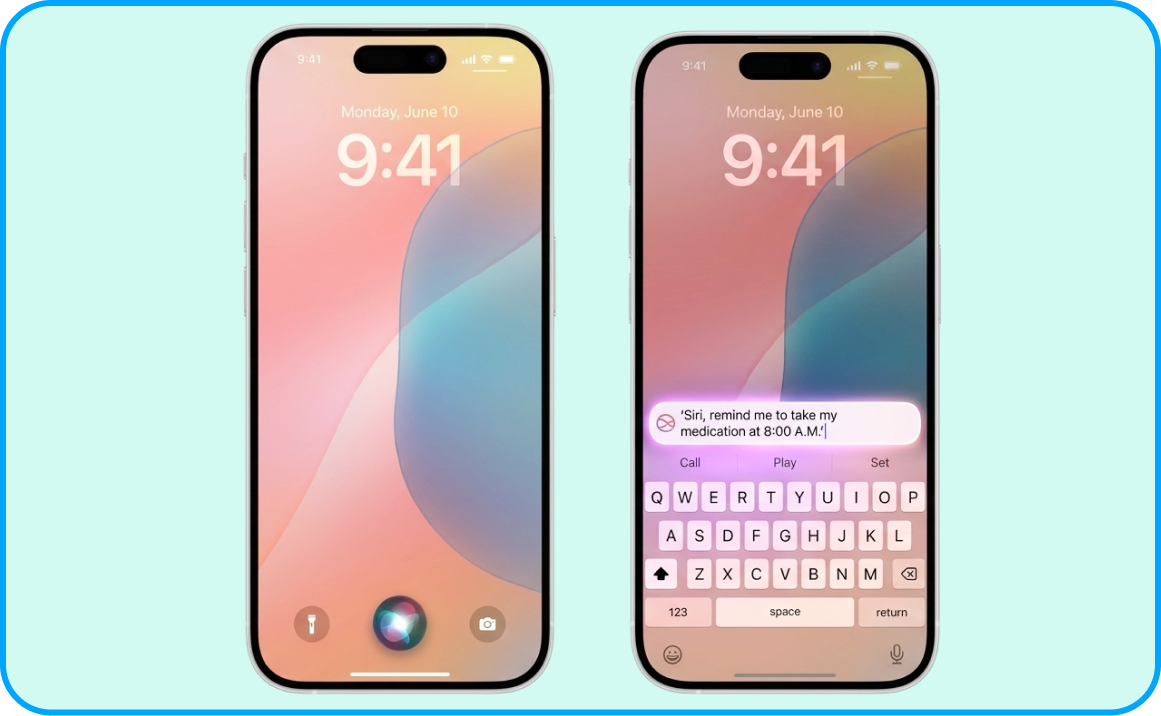
Many medication schedules are strict, especially when you’re managing chronic conditions such as diabetes at home. AI assistants such as Siri (on Apple devices) and smart speakers enable you to set recurring reminders using only your voice.
- Example: If you have an Apple device with Siri activated, you can simply say, ‘Siri, remind me to take my heart medication every morning at 8:00 A.M.’ Your device will notify you daily at that time, so you no longer have to keep a mental clock running.
Explaining Complex Medical Terms in Plain Language
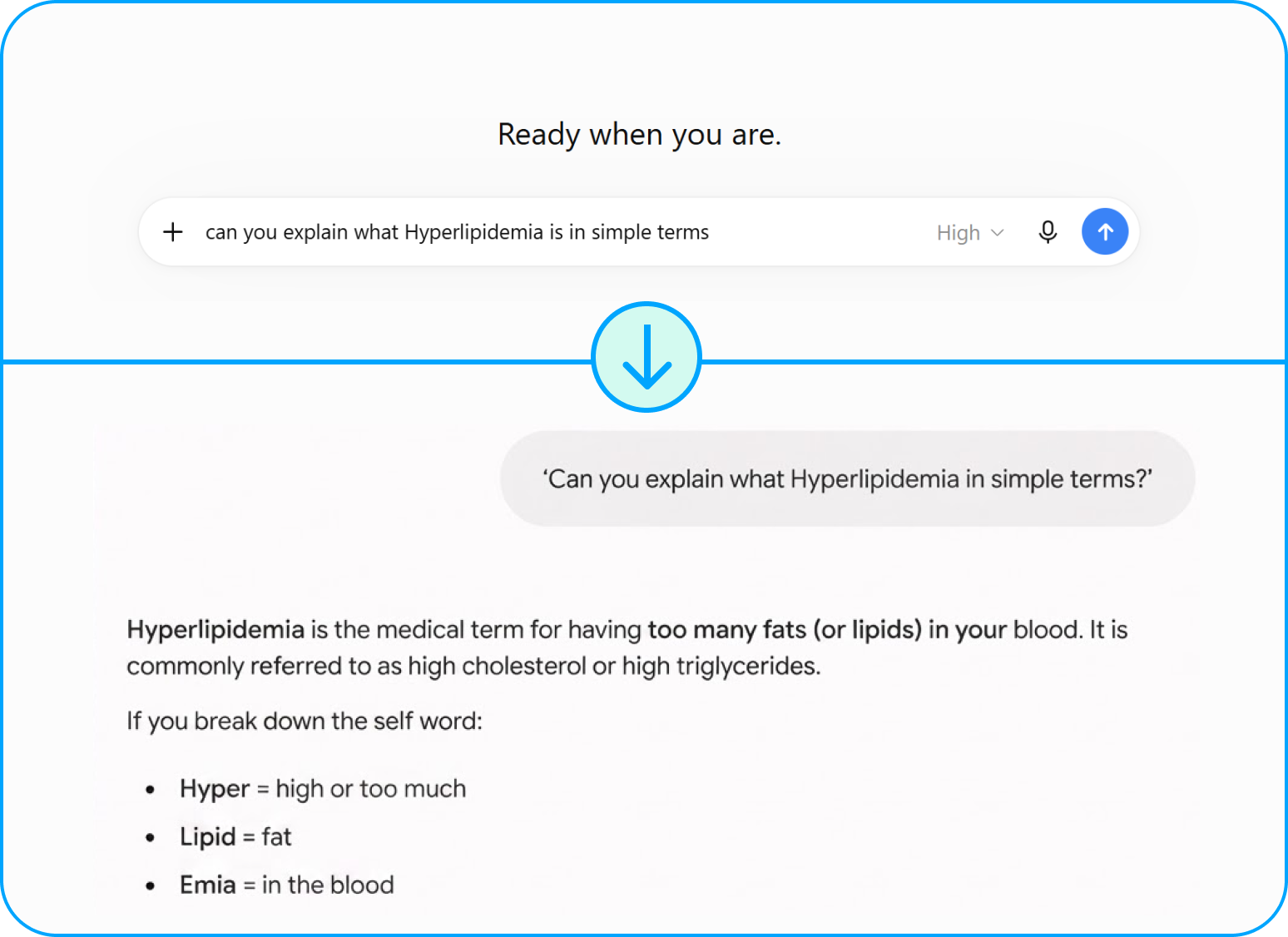
Have you ever looked at test results or a discharge summary and felt like it was written in a foreign language? AI tools such as ChatGPT and Google Gemini are excellent at simplifying medical jargon and making it easier to understand.
- Example: On ChatGPT, Google Gemini, or another AI chatbot, type in your question, such as: ‘Can you explain what Hyperlipidemia means in simple terms?’ The explanation will appear on your screen, which you can read to learn more about the topic and prepare a list of questions for your next doctor visit.
2. Make Daily Communication Effortless
Staying in touch with your loved ones shouldn’t be a chore. AI helps you transfer your thoughts and feelings to your screen for easy sharing.
Speech-to-Text for Easier Messaging
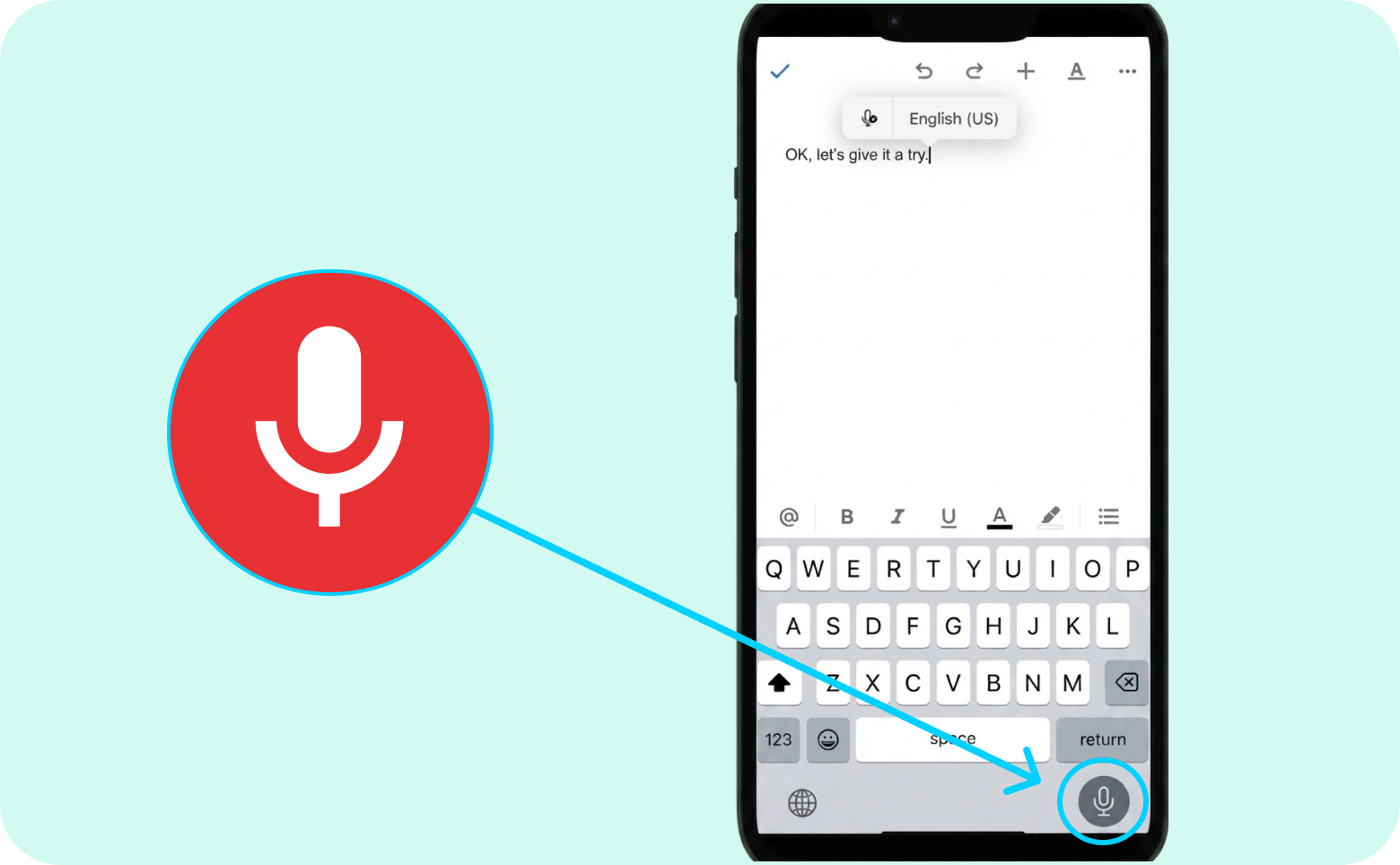
If typing on a small smartphone screen is difficult for you, Speech-to-Text can be an invaluable tool. Most modern smartphones have a microphone icon on the keyboard—simply tap that icon and begin speaking.
- Example: Whether you want to confirm a lunch date time with your friend or send your granddaughter a thoughtful message, tap the microphone icon on your phone’s keyboard and start talking. The AI will instantly transcribe your words into text on the screen, and when your message is complete, all you have to do is click ‘Send.’
Summarising Long Emails and Articles
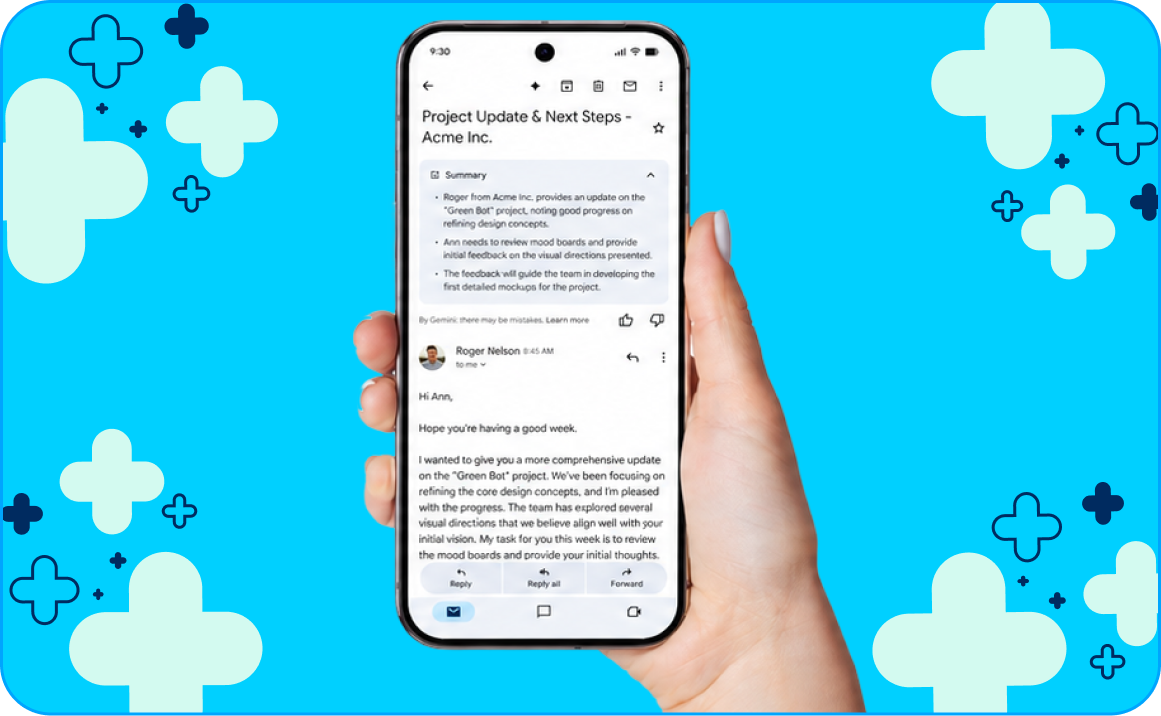
Information overload is a common occurrence these days, and it’s easy to miss important details buried in walls of text. AI can save you time and energy by breaking down wordy, complex pieces of writing into more manageable chunks.
- Example: Gmail, Google’s email service, provides AI overviews that pull key points from lengthy email threads, making them easier for you to scan at the top of the page. You can also copy long pieces of text (from a news article, for instance) into Google Gemini, ChatGPT, or another AI tool and ask it to create a summary.
3. Stay Sharp with Cognitive Exercises
In recent years, science has shown that ‘mental fitness’ is just as important as physical fitness. AI offers a fun and low-pressure way to keep your mind engaged.
AI-Powered Brain Games and Puzzles
Brain-stimulating games such as chess and Sudoku keep your mind sharp, and modern technology ensures you can get a mental workout anytime, anywhere.
- Example: Apps such as Lumosity, BrainHQ, and Elevate use AI to create personalised brain “workouts” focused on memory, focus, and cognitive processing. The personalised nature of these games is more than just a nice touch: if a game becomes too easy or too hard, AI adjusts the difficulty level so you’re always challenged but never discouraged.
Quick tip: Before downloading apps, it’s good practice to check if they require a subscription or begin charging after a free trial.
Language Learning at Your Own Pace
Learning a new language is a beneficial activity for anyone of any age, and it’s one of the best cognitive activities for older adults. It keeps the mind active and strengthens memory, and it may even spark ideas for travel.
- Example: AI-driven language apps make studying a new language feel like a game. They’re accessible on smartphones, and you can practise for a few minutes at a time based on your own goals and schedule. Some language apps focus on structured, conversational learning, while others employ quick, game-like tapping, so you can choose one that matches how you like to learn.
4. Rekindle Hobbies — or Just Relax
If you’re looking to rekindle an old hobby, start a new one, or just relax, AI can help with that, too.
Step-by-Step Instructions for Crafts and Small Repairs
Whether you’re fixing a leaky tap or learning to knit, AI can provide custom instructions.
- Example: You can ask AI, ‘How do I cast on for a scarf? Explain it as if I’m a complete beginner.’ Unlike a static book, you can ask AI to ‘explain that part again’ or ‘show me a different way,’ making it an interactive learning experience.
Personalised Reading and Movie Recommendations
When you tell AI about the books and films you’ve enjoyed in the past, it can generate lists of comparable titles so you can dive into your next cinematic or literary adventure.
- Example: Say (or type), ‘I really enjoyed The Thursday Murder Club. Can you recommend five similar cosy mysteries?’ AI looks at thousands of data points to find patterns in what you enjoy, leading you to your next favourite discovery.

5. Explore New Ways to Connect
While AI can’t replace human companionship, it can offer other ways to enjoy conversation, explore interests and discover opportunities to connect with people in your local community.
Interactive Conversation Partners
AI chat companions are designed to provide conversational responses. They can remember information from earlier chats when memory features are turned on, including specific details you’ve shared. This means you don’t have to repeat yourself every time you start a new conversation.
- Example: AI companion tools offer a safe, non-judgmental space to exercise your conversational skills and keep your mind engaged during quiet stretches. You can tell your companion about your day, discuss a news article, vent about your frustrations, or even practise the new language you’re learning from tip #3!
Note: Avoid sharing sensitive personal information, and remember that AI tools are not a substitute for a friend, counsellor or mental health professional.
Finding Local Community Events and Senior Centres
AI can help you find real-world connections, too.
- Example: Ask Siri, Alexa, or your preferred AI source, ‘What are some senior-friendly community events happening in [your suburb] this week?’ AI quickly scours local websites and calendars, presenting you with a list of opportunities to meet people nearby and establish new connections.
6. Enhance Your Home Safety and Comfort
Finally, AI-powered devices can help you manage parts of your home and make everyday tasks easier. These features vary depending on your devices, and some smart-home tools may require compatible equipment and setup. Once they’re up and running, though, they can simplify your day-to-day life.
Voice-Activated Helpers
Smart speakers can be especially useful AI tools for seniors. By connecting an Amazon Echo or Google Nest to your current appliances and placing it in your kitchen or living room, you gain hands-free control over your world.
- Example: Instead of struggling with small buttons or navigating the complex menus that often accompany modern appliances, you can ask your smart speaker for what you need—whether you want to adjust the temperature in your home or set a timer for the tea.
Smart Home Integration for Fall Prevention
Fall prevention is an integral aspect of ageing in place safely, and AI can mitigate risks. With smart lighting, you can schedule daily routines, control brightness and colours, and control your home’s lights with devices you already use, such as Siri or Alexa.
- Example: If you routinely use the bathroom at 2:00 A.M., you can schedule hallway lights to turn on gently so you never have to walk in the dark to find the light switch. Alternatively, if your smart lighting has built-in motion sensors, they’ll detect your movement and respond by illuminating the path to the bathroom.
Getting Started: Your First Three Steps
Are you ready to give AI a go? You don’t have to do everything at once. Follow these simple steps to get going.

1. Start Small with a Voice Assistant
If you have a smartphone, you already have AI. Practise asking Siri (on iPhone) or Google Assistant (on Android) simple questions, such as, ‘Hey Siri, what is the weather today?’ or ‘Hey Google, set a timer for 10 minutes.’ This builds your confidence in being heard by the machine.
2. Practise “Prompting” Like a Conversation
When you use a tool like ChatGPT, don’t worry about using the “right” words. Talk or type into it like a polite neighbour. Instead of typing, ‘Weather forecast Melbourne,’ try ‘Do I need an umbrella in Melbourne today?’ You’ll find the AI responds much better to natural language.
3. Practise with a Tech-Savvy Friend
Ask a child, grandchild, or friend who feels confident using AI to sit with you for 30 minutes and help you learn. They can:
- Show you how to perform a task
- Watch while you try it yourself
- Provide feedback and answer your questions
Practising the task yourself can make it easier to remember and help you feel more confident using AI on your own.
The Bottom Line: You’re in Control
Artificial Intelligence is a tool, much like a microwave or a washing machine. It’s designed to serve you, not the other way around. By using AI to handle the small details of daily life—medication reminders, grocery lists, and simple explanations—you free up your time and energy for what truly matters: your family, your hobbies, and your peace of mind.
Remember, you don’t need to master the technology; you only need to master its application. Start small, stay curious, and always trust your intuition.
Additional AI Resources for Seniors
- The CareSide’s AI training for seniors is a fun, interactive way to learn about AI and strategies for spotting it online. In the training, you’ll take on the role of a digital detective while solving AI cases and gathering helpful tips along the way.
- AI For Seniors: 8 Tips to Help Older Adults Stay Safe Online lists the best (and easiest) ways seniors can stay safe in an AI-driven world, including free AI-detection tools and technology-free online safety tips.
- How Seniors Can Use ChatGPT, an article from Seniors Guide, breaks down the practical ways older adults can use chatbots such as ChatGPT.
- Be Connected is a free Australian Government initiative that helps older Australians build confidence using smartphones, computers, online services and other everyday technologies. It offers online learning resources as well as support through community organisations around Australia.
- Senior Planet from AARP offers many virtual AI resources for seniors, including classes, articles and videos. Their AI for Older Adults guide is a balanced introduction to AI: it not only covers the pitfalls of newer technologies but also the benefits of AI and how it can help people as they age, including AI-assisted medication management, wearable devices, and other wellness-focused initiatives.
- AIandYou is a non-profit organisation based in the U.S., and its section for seniors is stocked with helpful resources, including a glossary, FAQs, and recent news stories about AI and how it’s impacting the lives of older people.